Timestone Software regularly updates the production applications in order to introduce new features, apply fixes, and maintain compatibility.
Timestone Software does not force updates, but only supports the latest version of the software.
It is the responsibility of the user to know their current version of the software and manage updates accordingly.
Equally important is to ensure all computers are updated at the same time to ensure each computer has the same version of each application.
Before Updating
Before updating to a new version of Timestone Software’s applications, the user should confirm which version they are currently running. The current version of the software can be seen on the splash screen of the application at launch or under Help> About {App Name}.
Caution
If the user is more than two full versions behind, such as moving from version 4.9 to 4.11, contact a member of the Timestone support staff for additional information and assistance updating.
Installing the new version of Timestone Software
To change versions:
Close ALL Timestone Software applications on the Entire network. No users/applications/machines should be accessing the database while the update is in progress.
Download the newest version from the website.
Run the installer.
When prompted by Windows, click More; then Run Anyway.
Check the appropriate box indicating the user has read and accepts the terms and conditions, and click Install
Click Finish when the installation is complete.
Before launching the applications, run the Timestone Administrator. This is a critical, but often forgotten, step of the installation process.
Continue to install the appropriate version of any Timestone Software applications on any/all workstations.
WARNING
After installing a new version, the Timestone Administrator (tsAdmin) should be launched. This will apply any necessary changes to the database. Note this step is only required once. For example if upgrading NeoPack and NeoComposite on multiple computers, it is only necessary to run tsAdmin once, not once per app or once per computer.
Troubleshooting “unconfirmed download” message
Occasionally, when downloading installers, Microsoft Defender or other security and anti-virus software will ask for confirmation that the user “trusts” Timestone Software.
In the case of interventions by Microsoft Defender, this message will often appear in the download menu of the browser and add an “unconfirmed download” file to the computer’s download folder until the following steps are taken:
In the internet browser, click the Downloads dropdown, typically represented by a down arrow, on the toolbar.
Hover the mouse over the message ”Install{App(V#_##_######)}.msi isn’t commonly downloaded…”, and Click the “…” button to gain access to a dropdown menu
Click Keep. Another message will appear “Make sure you trust Install{App(V#_##_######)}.msi before you open it…”
Locate the Delete V button and click the arrow portion of that button to view the option
Click Keep Anyway to download the installer.
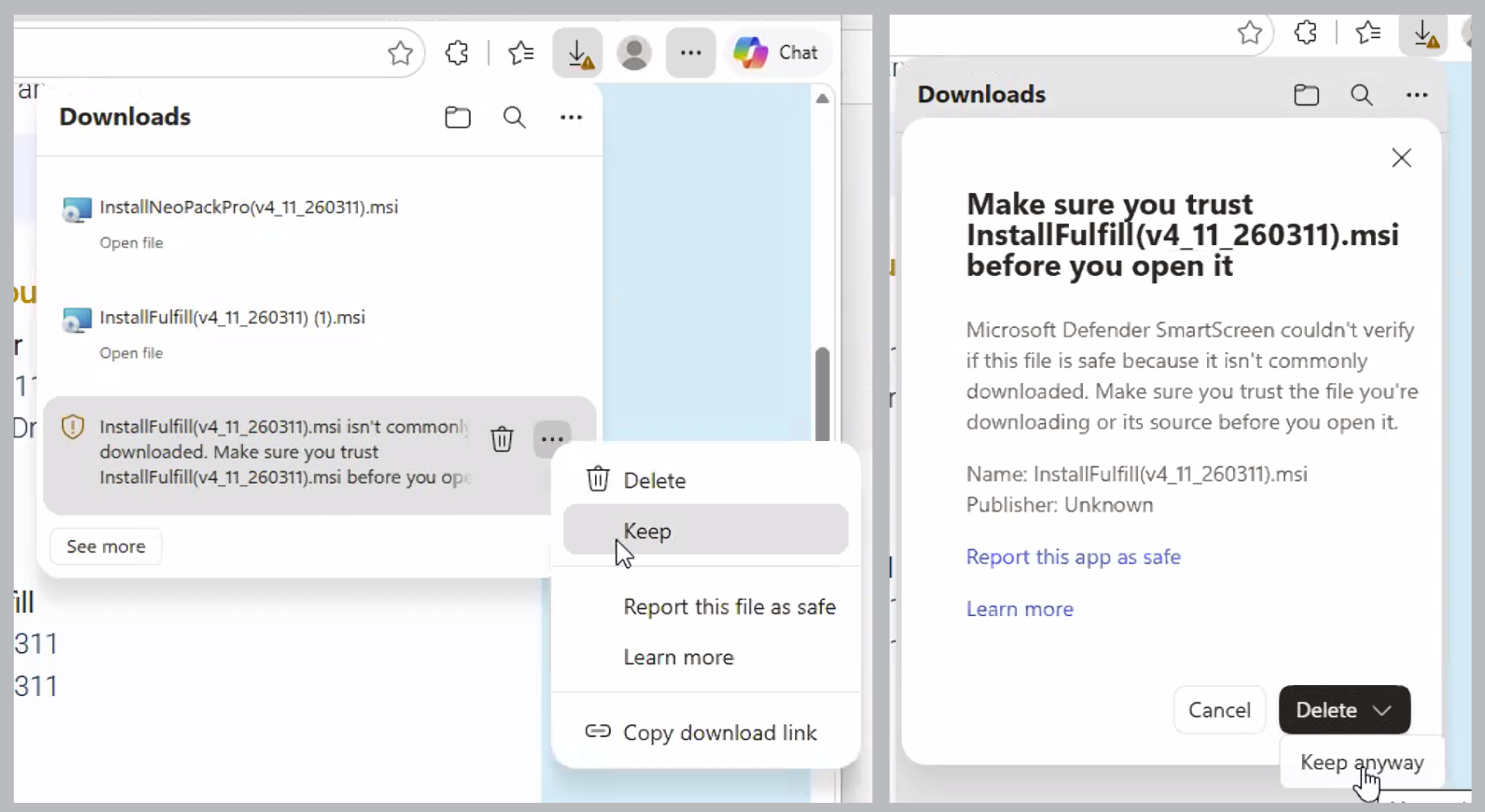
Figure 1: Troubleshooting the MS Defender “trust” menus
Updating IOS
Updates to the Timestone Internet Ordering System (IOS) are handled by Timestone Software staff.
FAQ
What versions of Timestone Software are currently supported?
Timestone Software supports the latest versions of the software.
Version 4.10 will no longer be supported as of June 30th, 2026. At this time, the 4.10 installers will be removed; please ensure you upgrade to v4.11 before this date.
I received the error “This application is newer than the database and is not compatible. You need to run a more recent version of Timestone Administrator to update the database.”
If you receive the message “This application is newer than the database and is not compatible. You need to run a more recent version of Timestone Administrator to update the database”, it means that the Timestone Administrator was not run before the app was opened. Please close the app and open tsAdmin to update the database.
How can I see my current version of Timestone Software?
You can check your current version on the splash screen at launch or under Help > About [App Name].
What should I do if I am more than two versions behind?
If you are more than two full versions behind, you should contact a member of the Timestone support staff for assistance.
Is it necessary to back up my database before updating?
Yes, it is recommended to back up your database often, but especially before continuing with an update.
What steps are involved in installing a new version of Timestone Software?
To install a new version, close all Timestone applications, download the latest version, run the installer, and run the Timestone Administrator to update the database.
Do all computers need to run the same version of Timestone Software?
Yes, all computers and applications must be running the same version of Timestone Software.