When an entity, most commonly a subject, does not have any images, the user may wish for some or all Packages not to be displayed in IOS.
Broadly, this can be achieved in two ways.
Applying an If has image limit to the Package
Using conditions
The first method has the advantage of simplicity, whereas using conditions allows flexibility, such as displaying the package for pre-order jobs but hiding it for subjects in post-order jobs when the subject was not photographed.
Further Reading: Conditional and Limited Packages
By default, Packages in the Timestone Internet Ordering System (IOS) are offered to all subjects. However, it is possible to restrict packages to specific subjects only. This can be achieved via Conditions - displaying packages only when the condition is met, and Limit tags - limiting packages according to folder tags.
The Has image limit
It is possible to limit the availability of a package by using the preset If has image limit in tsAdmin. With this limit checked, the package will only display when the subject has images.
In tsAdmin, select the desired Offer and Package
Select the Filters/Extras tab
Double-click the white area to display the Package Filters/Extra window.
Click the If has image option until a checkbox appears
Repeat for other packages as needed
.png)
Figure 1: Checking the If has image limit
The preset package limits
The If has image limit is one of the six ‘built-in’ package limits. The options are a ‘tri-state’ selection.
Taking the If has image limit as an example:
checked - the package will display only when the subject has images
unchecked - the package will display only when the package does not have images
dash (default) - the limit is ignored and the package will display regardless
In the screen grab above, the If has image limit has been checked, meaning the package will only display if the subject has images. Note the other limits are in the default, neutral state.
Conditions
Whereas the built-in package limits mentioned above offer a quick and simple solution, using conditions offers further flexibility and functionality.
Rather watch a video than read a document?
A movie tutorial accompanies this document
CASE STUDY
The movie tutorial above is a case study of a very common scenario where a photographer wishes to display packages for pre-order jobs (where nobody yet has images) but do not display packages post photography for any subjects who were not photographed and therefore do not have images.
Checking for images
The presence of entity images can be checked with the following condition.
Shoot>Images>Have images
.png)
Figure 1: A condition that checks for images
The condition will be ‘True’ when the current entity does not have any images and can be applied against a package. The package will then only display when the condition is true i.e. when the current entity does not have images.
Applying the condition to a package
The condition is applied to the package in tsAdmin in the Filter>Extras tab as shown below.
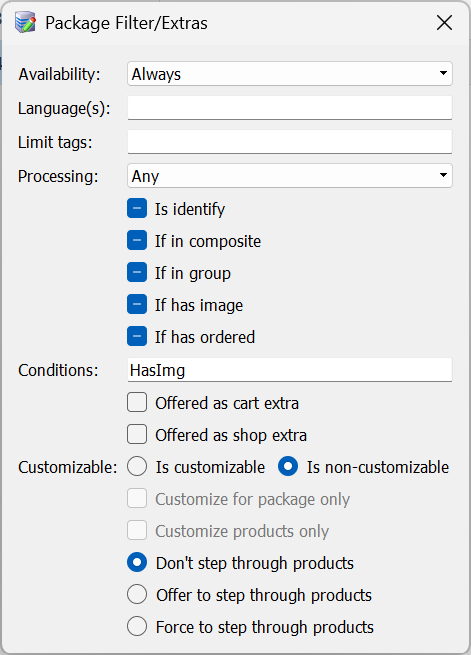
Figure 2: Applying a condition to a package
Checking the job type
As explained in the movie tutorial, a subject may not have images in two different circumstances
In a pre-order environment where photography has not yet occurred
Post photography for subjects who were not photographed
In this circumstance, it is possible to display packages in the first case but not the second. This is achieved by adding a second parameter to the condition that checks the job’s Order Processing selection.
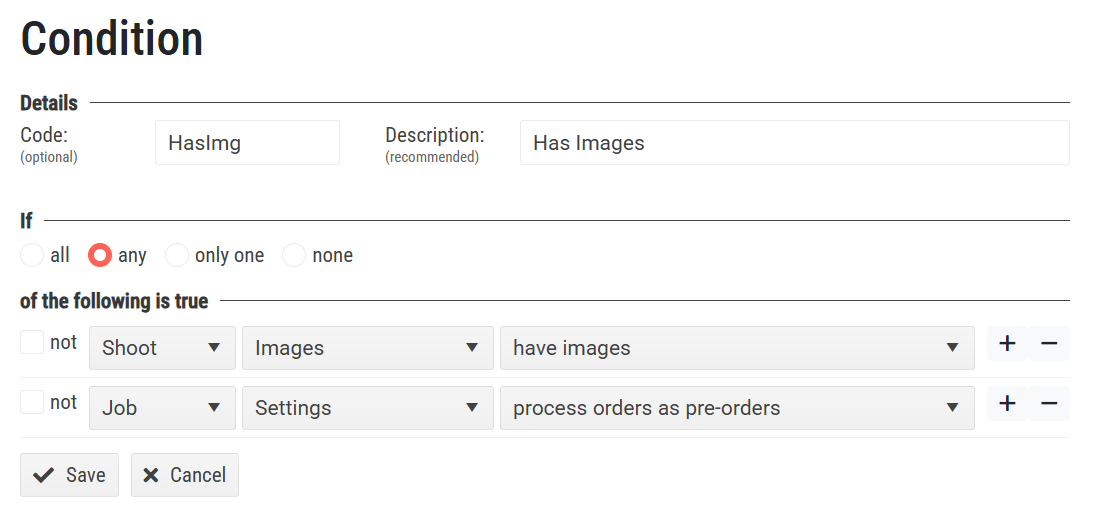
Figure 3: Adding a job parameter to the condition
Attention
Note the If statement of the condition above is set to any. The condition will therefore be true if either of the two parameters are true meaning the packages will display if the subject has images or if the job is a pre-order.
Using the condition with a snippet or popup
An advantage of using a condition to hide the packages in the absence of images is that the same condition (in the inverse or ‘not’ form) can be used to display a snippet or popup explaining why images and packages are not present.
The screen grab below shows a snippet definition that will display when the condition is not true - when the job is not a pre-order, and the subject has no images.
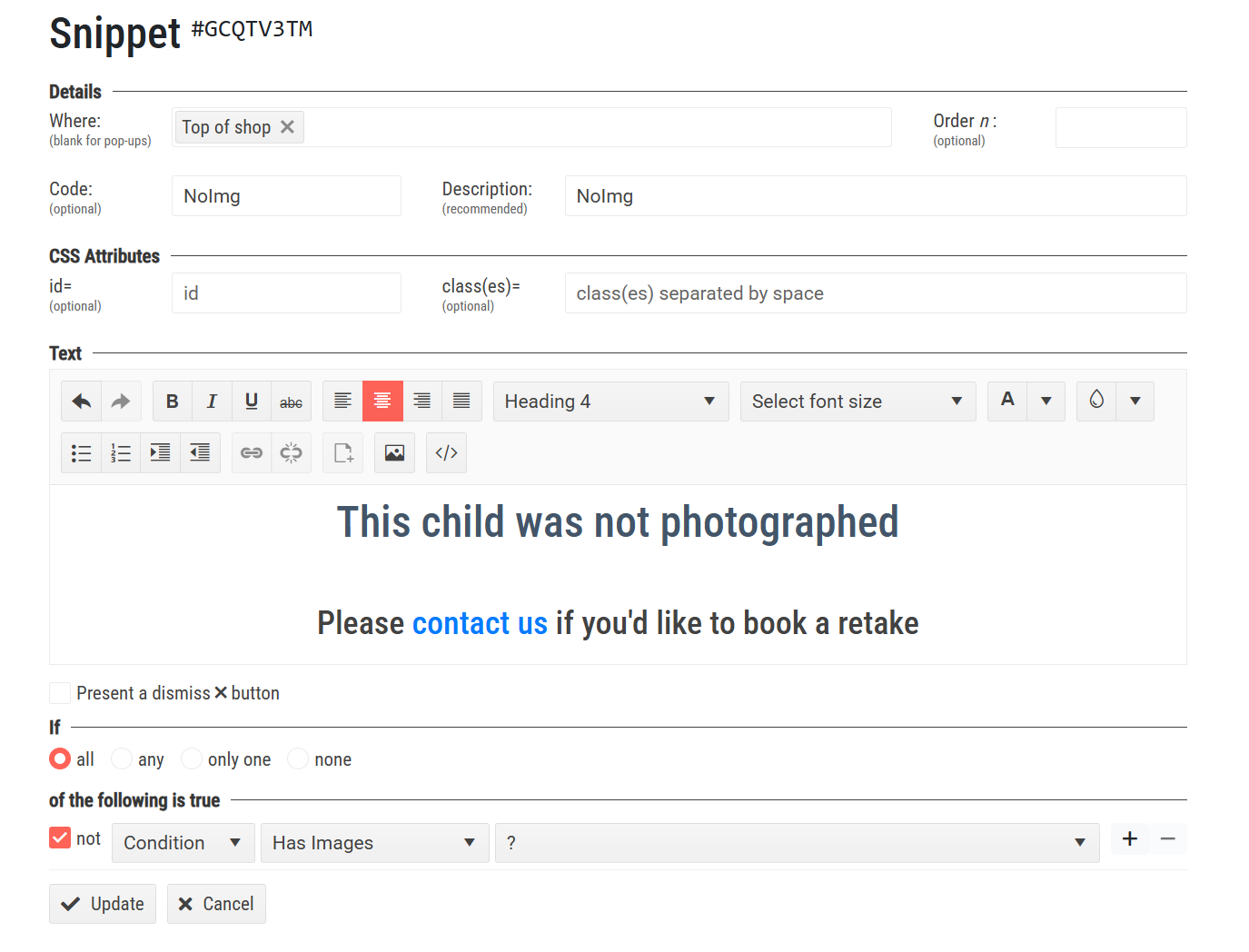
Figure 4: Displaying a snippet for subjects without images
FAQ
How can I limit the display of packages based on image availability?
You can limit package display by applying the 'If has image' limit or by using conditions.
Can I display packages for pre-order jobs even if there are no images but then hide them post-order when they don’t have images?
Yes, you will need to use a condition with two parameters. Have a look at the article and the video which demonstrates this exact scenario.
What condition checks if an entity has images?
The condition is 'Shoot > Images > Have images'.
Can I use conditions to display messages when packages are not present?
Yes, you can use conditions to display snippets or popups explaining the absence of images and packages.